Creating events and reminders
Right-click a date (control-click) in the grid to open the form for that day.
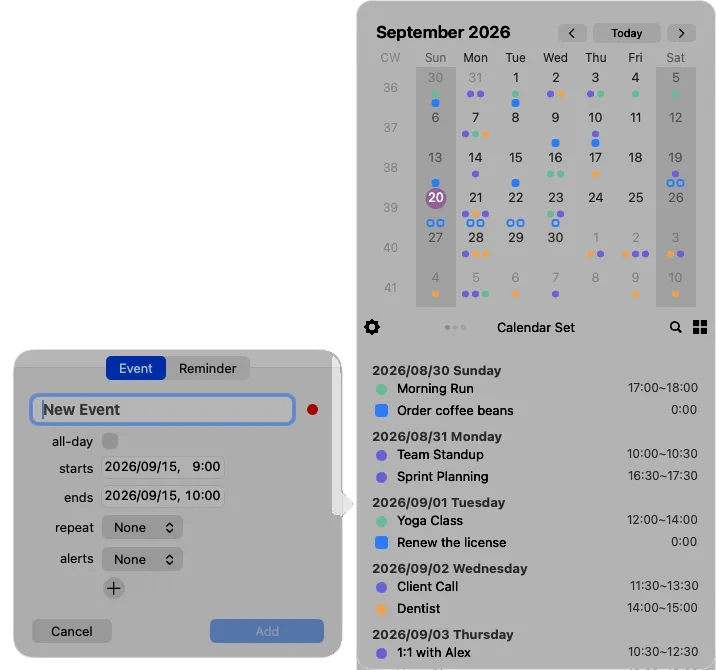
Choose Event or Reminder at the top, fill in what you need, and click Add.
Fields for an event
Section titled “Fields for an event”| Field | What it does |
|---|---|
| Title | The name of the event. Suggestions come from the past three years (see below) |
| all-day | Removes the times and makes it an all-day event |
| starts / ends | The date and time. The end must come after the start |
| repeat | None, daily, weekly, monthly or yearly, with an interval and an end date |
| alerts | When to be notified beforehand. Use + to add more than one |
| Calendar | Click the colored dot next to the title to choose where it is saved. Calendars are grouped by account and sorted by name |
Title suggestions
Section titled “Title suggestions”As you type a title, Calinsight offers up to six events from the past three years that start the same way. Use ↑↓ to choose one and press Return, or click it. You can also ignore the suggestions and keep typing.
Repeating events
Section titled “Repeating events”Weekly lets you pick the days, monthly the dates, and yearly the months and dates — the same options as Custom in the macOS Calendar app. If an event already has a rule more complex than these, Calinsight keeps that rule as it is.
Fields for a reminder
Section titled “Fields for a reminder”A reminder has a title, a due date, a repeat rule, alerts and a list. The due date is optional.