Finding your way around
The menu bar icon
Section titled “The menu bar icon”The icon is not a fixed image. It shows today’s date, and its underline becomes thicker when you have events or reminders today. It redraws itself when the date changes.
Click the icon to open the Calinsight window, and click again to close it. Right-click (or control-click) the icon for a menu that opens Settings or quits Calinsight.
Three views
Section titled “Three views”Calinsight has three views. Click the view name in the middle of the bar to move to the next one. The dots to its left show which view you are on.
| View | Contents | Shortcut |
|---|---|---|
| Calendar Set | The month grid, and the list of events and reminders from the selected day onward | ⌘1 |
| Reminder Dashboard | Counts of completed reminders | ⌘2 |
| Event Dashboard | Counts of events | ⌘3 |
The month grid
Section titled “The month grid”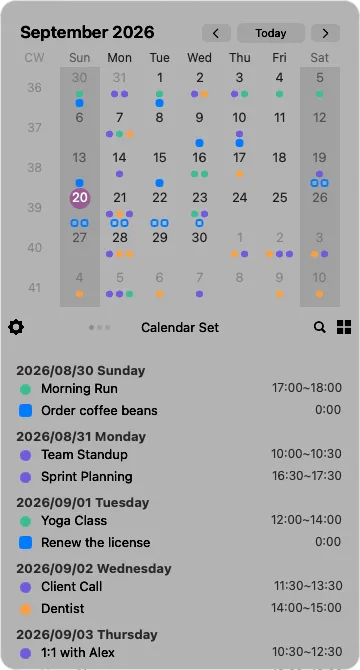
- Dots — days that have events or reminders. Each dot takes the color of its calendar
- Today — the number is circled
- CW — the calendar week number
- Saturday, Sunday and holidays — you can give these a background color in Settings
Below the grid, the bar holds Settings (gear) on the left, the view name in the middle, and Search (magnifier) and Filter on the right.