Searching
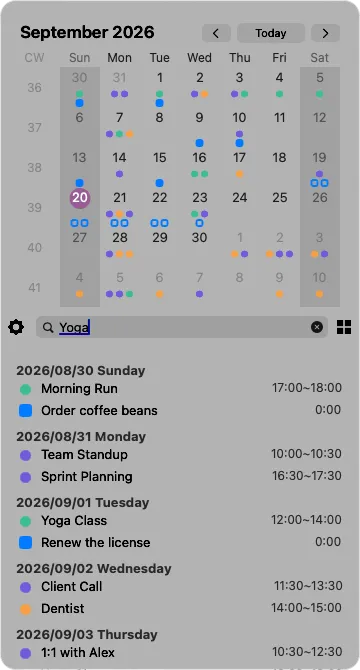
Click the magnifier in the bar or press ⌘F. The middle of the bar turns into a search field.
Reading the results
Section titled “Reading the results”Results appear in the list in two sections:
- Upcoming — events and reminders from today onwards, nearest first
- Past — everything earlier, most recent first
The grid narrows down at the same time. Days with no match are dimmed, so the days that do match stand out. Today’s marker stays as it is.
Opening a result
Section titled “Opening a result”Click a result and the grid moves to that month while the search stays open, with the matching dot growing briefly to show you where it is. You can go straight on to the next result.
Closing the search
Section titled “Closing the search”Press Esc or click ✕. The first press clears what you typed; the second closes the field. Switching views with ⌘1–⌘3, or closing the Calinsight window, also ends the search.